SQL From Zero: Asking Your First Questions
Introductions, exercises and summaries stay visible.
12.0 What this chapter gives you#
- You will read a small SELECT statement as a question about named records rather than a mysterious command.
- You will choose explicit output columns and keep track of what one result row represents.
- You will filter values with comparisons, AND, OR and explicit parentheses.
- You will explain why a missing customer link needs
IS NULL, not equality with NULL. - You will request a meaningful, deterministic order and resolve ties before applying a row limit.
- You will calculate line amounts without replacing agreed prices with current catalogue values or losing units.
- You will use aliases, CASE and COALESCE while distinguishing presentation from stored truth.
- You will insert, update and delete only inside a disposable draft workspace, inspecting target rows and rollback behaviour.
- You will bind values as parameters instead of mixing untrusted text into SQL syntax.
- You will run a guarded draft update and state the limits of its expected-value check, transaction and tests.
All runnable examples in this chapter belong to fresh teaching databases. They do not connect to a live shop, the owner’s website or an existing database file. The two canonical agreed orders remain unchanged; editing exercises use the separate fictional draft D-SQL-01. Joins, grouping and normalisation appear in greater depth in subsequent chapters. Here the goal is to ask a few precise questions and observe exactly what the answers establish.
12.1 Reading SELECT aloud#
12.1.1 PLAIN — in simple words#
- SQL is a language for describing operations on a database. Its name expands to Structured Query Language. In this chapter we start with SELECT, which describes a result we want to read.
- Read a simple statement as “show these values from these records”.
SELECTnames the output values;FROMnames the source table. - The output is a result table with rows and columns. It can omit source columns, calculate new values and later combine or group records. It is not automatically a full copy of the original table.
- SQL does not require you to write a loop that visits each record. You describe the required result, and the engine chooses a way to produce it under its supported semantics.
- Explicit column names make the question easier to review.
SELECT *is useful for quick exploration, but an application relying on a stable output shape should know which columns it expects. - A semicolon commonly marks the end of a SQL statement. Newlines and indentation make a longer statement easier for people to read; they are not instructions to process one row per line of code.
- The read-only examples below ask about recorded values. They do not establish whether the underlying fictional sale actually occurred; that distinction from Part A still applies.
12.1.2 PLAIN — a picture in your head#
- Imagine asking a filing assistant for a report: “From the order-line cards, copy the order identifier, line number, product, quantity and agreed unit price.”
- You specify the answer’s fields, not every movement of the assistant’s hands. The assistant can choose an efficient route through the filing system.
- If you ask only for product names, you may receive repeated names because different line cards mention the same product. The report has not magically become a unique product catalogue.
- Where the comparison breaks: a database follows formal rules and may use indexes, parallel work or other execution strategies. It does not interpret a vague request as a human assistant might.
- In particular, do not expect it to guess missing ordering, units or business intent. Those belong in the query or its documented result contract.
- The analogy helps you read the question aloud. The engine’s physical execution plan is a separate topic, developed later.
12.1.3 PLAIN — a worked example#
- Open the extracted practice-code folder. The following Python session uses the provided helper to create a fresh in-memory copy of the four agreed lines. No connection string or password is required.
from contextlib import closing
from schema_sql_lab import canonical_shop

with closing(canonical_shop()) as db:
    rows = db.execute("""
        SELECT order_id, line_no, product_id,
               quantity, unit_price_minor
        FROM order_lines
        ORDER BY order_id, line_no
    """).fetchall()
    for row in rows:
print(row)- Read the SQL aloud: “Show each line’s order, line number, product, quantity and agreed unit price, from order lines, ordered by order and then line number.”
- The result is the unchanged canonical fixture:
| order_id | line_no | product_id | quantity | unit_price_minor |
|---|---|---|---|---|
| O-1042 | 1 | P-NOTE | 2 | 7,550 |
| O-1042 | 2 | P-PEN | 1 | 2,000 |
| O-1043 | 1 | P-NOTE | 1 | 7,550 |
| O-1043 | 2 | P-PEN | 2 | 2,000 |
- Python prints tuples rather than this typeset table. The underlying values agree; thousands separators in the book are presentation, not literal commas stored inside the integer amounts.
- Asking only for
product_idreturns four visible product values. Asking forDISTINCT product_idreturns two distinct represented product identifiers. Neither question asks how many physical units were sold. fetchall()is appropriate for this four-row exercise. Fetching an unbounded production result into memory has a different resource cost; later chapters discuss limits and execution plans.
12.1.4 PLAIN — what is really happening inside#
- The driver sends the statement to the engine associated with this connection. The engine parses the SQL, resolves the named table and columns, and prepares a way to produce the result.
- The select list describes output expressions. A bare column name copies that column’s value for the relevant source row; a later arithmetic expression calculates a value from it.
- The engine returns rows to the driver, and Python exposes those rows
through a cursor.
fetchall()collects the remaining result rows into a list in this interface. [S86] - The input table’s key need not appear in the result. Omitting the key can make different source records look the same, even when their identities remain distinct in storage.
DISTINCToperates on the selected output values. It does not decide whether two real-world events were duplicates or whether earlier input was incorrect. [S80]- The physical route can change without changing the required answer. Adding a later index should not entitle an application to rely on an unrequested result order.
- The known fixture gives us a reference answer that can be checked by hand. Start with that small observable case before interpreting the speed or correctness of a large result.
12.1.5 TECHNICAL — the engineer’s version#
- SELECT is declarative: its clauses specify result semantics, while the engine chooses an execution strategy. The simplified conceptual sequence used in this chapter is an explanatory model, not a promise about physical operator order. [S79] [S80]
- In the basic single-table case, identify the source, apply the row predicate, evaluate output expressions, apply requested duplicate elimination, order the result and apply the row limit. Later features introduce additional stages and interactions.
- An output column can be a source column, a literal or an expression.
For example,
quantity * unit_price_minoris an expression with the current line’s agreed quantity and price as operands. - Keep identifier and literal syntax distinct.
order_idnames a column;'O-1042'is a text value. SQL text literals use single quotes in these examples. Do not teach double-quoted identifiers as a portable replacement for text literal syntax. [S72] - The example’s Python connection is a new in-process SQLite database. PostgreSQL tutorial syntax is useful comparative documentation, but a PostgreSQL server, roles and connection lifecycle are not exercised here.
- The Python helper closes the database after the block using
contextlib.closing. A connection’s transaction context-manager behaviour and actually closing that connection are not the same operation; the distinction is explicit in the driver documentation. [S86] - Basic read-only SELECT statements here have no intended mutation effects. Do not generalise that every possible SELECT in every engine is incapable of side effects; functions and product-specific features require their own contracts.
- The result contract is five named fields, one row per canonical order line, integer quantities, integer paise and explicit identity ordering. That is a precise answer to review against the fixture rather than the vague goal “show the sales data”.
12.1.6 WORDS — remember these#
SELECT statement: a description of an answer to read — a SQL query specifying output expressions and the operations needed to define a result.
Select list: the values requested for each output row — the column references or expressions following SELECT.
Text literal: text written as a value in a statement — a quoted string such as
'O-1042', distinct from a column identifier.
Cursor: the driver’s interface to a statement and its results — an object through which rows and relevant execution information are retrieved.
Declarative query: a request that describes the required result — a statement whose logical meaning does not prescribe one physical execution plan.
12.2 Filtering and NULL#
12.2.1 PLAIN — in simple words#
- A filter selects records meeting a condition. In SQL, a WHERE clause expresses that condition.
WHERE quantity = 2means “keep lines whose recorded quantity is two”. It does not mean “keep two rows” or “find orders containing exactly two lines”.- AND requires both conditions to hold. OR allows either. Parentheses make the intended grouping clear when several conditions are combined.
- A WHERE filter keeps a row when its condition evaluates to true. False and unknown results are not retained.
- NULL is the marker used for missing information in these examples.
Ordinary equality with NULL does not ask whether a value is missing. Use
IS NULLfor that question. - “Not equal to C-001” and “not equal to C-001, including missing links” are different questions. The second needs to mention the missing case explicitly.
- A filter can answer only a condition defined over available data. No linked profile does not automatically reveal why the link is absent or identify the buyer.
12.2.2 PLAIN — a picture in your head#
- Imagine sorting cards into a tray labelled “quantity is two”. A card showing two goes in; a card showing one does not.
- A card with the quantity field missing does not prove that its quantity is two. It also does not prove that the quantity is one. For this particular positive condition, it is not selected.
- Now make a different tray labelled “quantity missing”. That is a direct question about absence rather than a numeric comparison.
- Where the comparison breaks: SQL does not rely on a person’s interpretation of a blank card. Its operators define precise truth outcomes, including how unknown combines with AND and OR.
- A display may draw NULL as an empty cell, the word NULL or another label. The visual appearance does not change the stored marker’s query semantics.
- Ask the desired question explicitly instead of hoping a comparison will interpret absence in the way a human reader expects.
12.2.3 PLAIN — a worked example#
- Find the canonical lines with quantity two, and calculate their line amounts:
SELECT order_id, line_no,
       quantity * unit_price_minor AS line_total_minor
FROM order_lines
WHERE quantity = 2
ORDER BY order_id, line_no;- The answer contains O-1042 line 1 with 15,100 paise and O-1043 line 2 with 4,000 paise. That is two lines, representing four units and 19,100 paise under the unchanged fixture.
- Next ask which orders have no linked customer profile:
SELECT order_id
FROM orders
WHERE customer_id IS NULL
ORDER BY order_id;- The answer is O-1042. Replacing
IS NULLwith= NULLreturns no rows in the lab, not the desired missing-link result. - Now compare two other predicates.
customer_id <> 'C-001'returns no rows: O-1043 equals C-001, while O-1042’s comparison is unknown. AddingOR customer_id IS NULLreturns O-1042. - A further deliberately misleading predicate,
customer_id NOT IN ('C-001', NULL), also returns no rows for this fixture. The NULL in the list prevents the easy “everything not in this list” intuition from being a safe general explanation. [S24] - Each outcome is recorded by
first_questions(). The test names distinguish the intended missing-value query from the deliberately incorrect equality example.
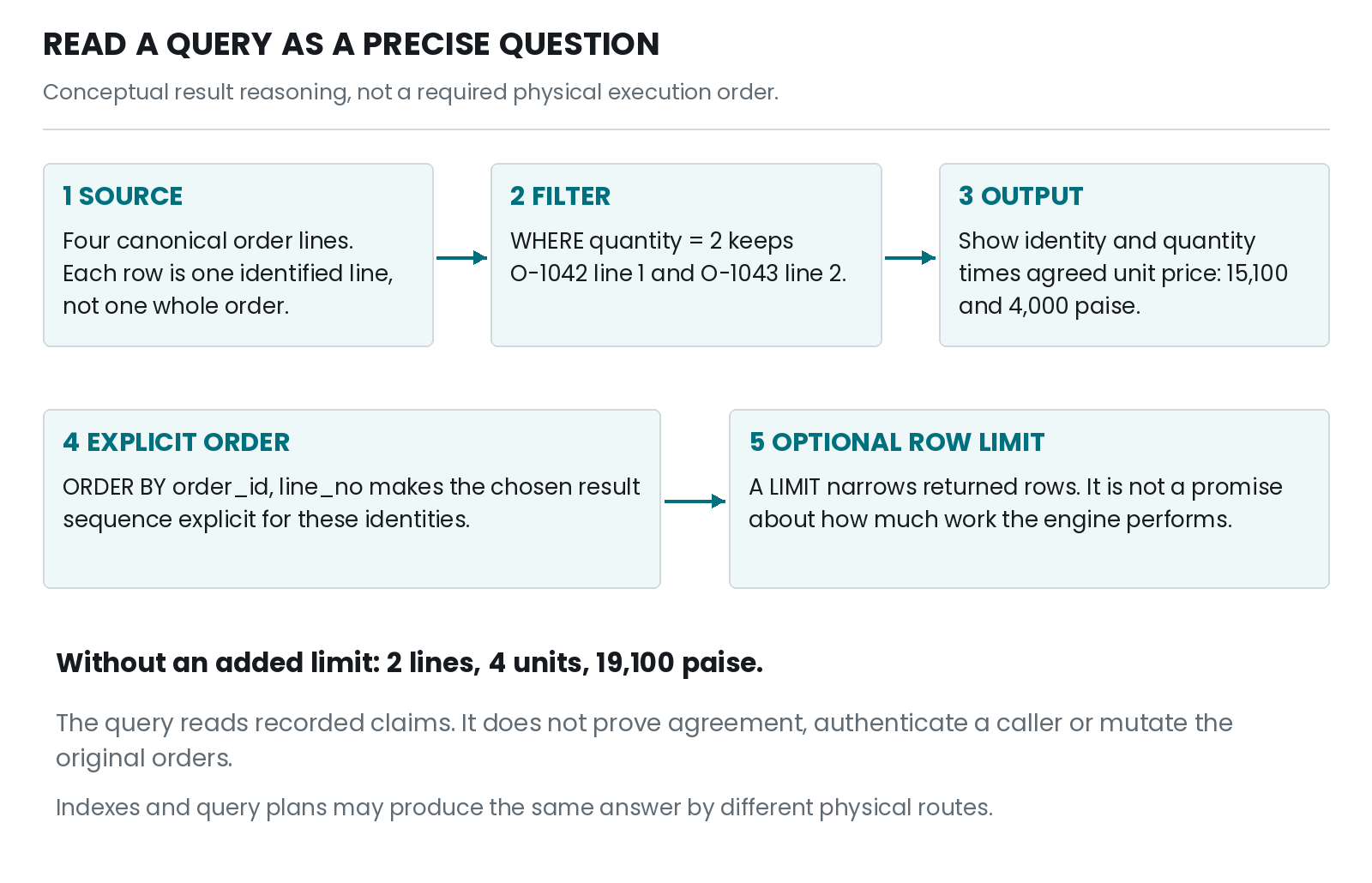
Figure 12 — A conceptual path through the quantity-two query: source, filter, output, explicit order and an optional result limit. These are result semantics, not a required physical execution plan.
12.2.4 PLAIN — what is really happening inside#
- An expression can yield true, false or unknown. The missing customer link is not silently replaced with a made-up identifier before evaluation.
customer_id IS NULLdirectly tests the marker and produces a known truth result. Ordinary equality compares values, and an unavailable operand cannot generally establish equality or inequality.- Combining conditions requires the full truth rules. True AND unknown is unknown; false AND unknown is false. True OR unknown is true; false OR unknown is unknown.
- Those rules explain the explicit missing branch. On O-1042,
customer_id <> 'C-001'is unknown butcustomer_id IS NULLis true; unknown OR true is true, so the row is selected. - Parentheses determine the grouping you intend. SQL’s normal operator precedence does not rescue a predicate whose writer mentally grouped it another way.
- For example, “quantity is two, or quantity is one and product is notebook” also includes the two-unit pen line. “Quantity is two or one, and product is notebook” requires parentheses around the quantity alternatives and selects the two notebook lines instead.
- The database evaluates the written predicate, not the surrounding business sentence. Read both aloud and test a row that distinguishes the two interpretations.
12.2.5 TECHNICAL — the engineer’s version#
- Three-valued logic is easiest to verify with a small table. Here U means unknown and T/F mean true/false. These cases are the logical results relevant to the illustrated predicates. [S24]
| Left and right values | AND result | OR result |
|---|---|---|
| T and U | U | T |
| F and U | F | U |
| U and U | U | U |
| T and F | F | T |
NOT Uremains U. Therefore merely negating an ordinary comparison with a missing operand does not make missingness become a known positive match.INandNOT INneed special attention when a list or subquery can contain NULL. The lab’s fixed two-item example is a direct demonstration, not a recommendation to clean unknown values by deleting them indiscriminately.- Parenthesise mixed AND/OR predicates for intent. Compare
quantity = 2 OR quantity = 1 AND product_id = 'P-NOTE'with(quantity = 2 OR quantity = 1) AND product_id = 'P-NOTE'. The first admits three canonical lines; the second admits two. [S24] BETWEENincludes both endpoints in these SQL examples. For the storage rangeBETWEEN 1 AND 10000, 1 and 10,000 are not off-by-one exceptions. Missingness still needs a separate policy.- Keep record identity semantics distinct from convenience filtering.
The provided
lines_for_order()binds the exact identifier rather than trimming or case-folding it. A caller must not silently change an identifier to make a query appear to work. - WHERE keeps true rows; it does not report why the others failed. A missing result can mean no matching stored row, a predicate mismatch or an intended exclusion. Diagnose using authorized additional evidence rather than inventing one explanation.
- For a real application, filtering is not authorization by itself. A user-supplied order identifier that returns a valid record still needs an access decision. This learning database deliberately contains no user authentication or permission system.
12.2.6 WORDS — remember these#
WHERE predicate: the condition deciding which source rows qualify — a Boolean-like SQL expression for which only true rows are retained by the filter.
Three-valued logic: reasoning with true, false and unknown — SQL expression semantics needed when operands can be NULL.
IS NULL: a direct test for missingness — a SQL predicate that checks whether an expression yields the NULL marker.
Operator precedence: the default grouping rules for an expression — syntax rules that determine binding unless parentheses explicitly override the grouping.
Inclusive interval: a range containing its endpoints — the boundary interpretation used by BETWEEN in the illustrated SQL conditions.
12.3 Explicit ordering#
12.3.1 PLAIN — in simple words#
- A query result is not guaranteed to arrive in the order you saw last time unless the query asks for an appropriate order.
ORDER BY order_id, line_nomeans sort first by order identifier, then sort lines within equal order identifiers by line number.ASCrequests ascending order and is the default direction for an ordinary listed sort expression.DESCrequests descending order.- Sorting by a value that can tie does not fully specify the order between tied rows. Add a suitable tie-breaker when the sequence matters.
- A LIMIT clause restricts how many rows the result includes. Without a defined order, “the first two” is not a reliable description of which two the application will receive.
- Even a deterministic ordering of one result does not freeze the database for several later page requests. Concurrent changes and snapshot choices are a separate question.
- Order by the meaning the reader needs, not a guessed physical storage position. The key can be a useful tie-breaker, but it does not automatically mean chronological order.
12.3.2 PLAIN — a picture in your head#
- Imagine sorting exam cards by score. Two students can have the same score, so their order is still undecided.
- Adding an agreed second rule, such as a unique registration identifier, makes the ordering explicit for ties.
- Taking the first two cards before sorting answers a different question from sorting by score and then taking the first two.
- Where the comparison breaks: database execution need not physically sort every row before applying a limit. An index or another plan may produce the same required answer more directly.
- The picture explains the logical result, not performance. Nor does the registration identifier prove which student took the exam earlier.
- A repeatable order also does not prevent a card’s score changing between separate requests. That requires a defined snapshot or another consistency strategy.
12.3.3 PLAIN — a worked example#
- Ask for the first two canonical line identities when higher agreed unit prices come first:
SELECT order_id, line_no
FROM order_lines
ORDER BY unit_price_minor DESC, order_id, line_no
LIMIT 2;- The two notebook lines both have an agreed unit price of 7,550 paise. The order identifier and line number break the tie. The result is O-1042 line 1, followed by O-1043 line 1.
- Removing the tie-breakers leaves the order between those equal-price lines unspecified by that reduced ordering request. The fact that a tiny database happens to return them the same way twice is not a stronger contract.
- Notice the question uses unit price, not line total. O-1042’s two notebooks have a line total of 15,100, while O-1043’s one notebook totals 7,550. They tie by unit price but not by line total.
- The helper supports three fixed sort choices: identity, quantity and price. Quantity and price sorts both add the full line identity as tie-breakers.
- An invalid sort choice is rejected; it is not copied into the statement. Parameter binding and the distinction between values and SQL structure are developed in section 12.6.
- The number two limits returned rows. It does not promise that only two source rows were inspected or that the query took constant time. [S81]
12.3.4 PLAIN — what is really happening inside#
- The engine must produce an answer consistent with the requested ordering. It may sort intermediate results or use a suitable existing access path.
- If no ordering is requested, a different plan, index, maintenance operation or dataset can change the observed sequence without violating the query’s contract. [S03]
- A multi-column order compares the first expression, then subsequent expressions for ties. A complete unique key after the business sort gives the illustrated fixture a total order over its returned line identities.
- The choice of text comparison matters when text is sorted. The book’s fixed ASCII-like identifiers keep the examples small; language-aware sorting of names needs explicit comparison rules rather than a universal “alphabetical” assumption.
- NULL placement also needs an engine-aware decision when sorting optional values. This chapter’s principal sorts use the non-null canonical line fields, avoiding an unstated missing-value ordering policy.
- Pagination adds another boundary. A page shown now and a page fetched later may refer to different database states. An explicit sort is necessary for meaningful selection but not sufficient to define the whole multi-request experience.
- Later chapters connect ordering to indexes, execution plans and keyset pagination. At this stage, do not confuse “I asked for the first two” with “the engine found the only possible first two without any other assumptions”.
12.3.5 TECHNICAL — the engineer’s version#
- Distinguish partial ordering by a non-unique sort key from a complete deterministic sequence under chosen comparison semantics. A unique tie-breaker completes the illustrated order, provided the query does not introduce duplicate output identities through later transformations.
ORDER BY unit_price_minor DESC, order_id, line_noorders by recorded agreed unit price and then full source identity. It does not imply ranking by quantity, contribution, recency or product popularity.- ORDER BY belongs to the query whose final output order is required. Do not rely on an internal subquery’s incidental sequence as a substitute for a declared final ordering. [S03] [S80]
- LIMIT is an output-cardinality constraint rather than a resource budget. A correct plan might inspect many records to identify the requested top results. Execution-plan analysis is needed before making a performance claim. [S81] [S65]
- OFFSET pagination and concurrent changes can produce user-visible shifts between requests. Stable identity tie-breakers do not themselves supply a shared snapshot across separate transactions. The later concurrency chapters make the required isolation assumptions explicit.
- Dynamic ordering requires trusted SQL structure. This lab maps a
validated choice to one of three complete fixed statements. It does not
try to bind a column name into
ORDER BY ?and assume the placeholder becomes an identifier. - Test tie cases deliberately. A fixture in which every price differs can conceal missing tie-breakers. The two equal notebook unit prices make the issue observable in the canonical dataset.
- Keep claims at their scope: the tests verify chosen result sequences for the known records and sort choices. They do not benchmark sorting or certify multilingual collation, stable web pagination or concurrent reading behaviour.
12.3.6 WORDS — remember these#
ORDER BY: the requested ordering of a query result — a clause specifying sort expressions, directions and applicable ordering semantics.
Tie-breaker: an additional rule for equal primary sort values — a subsequent sort expression used to distinguish otherwise tied rows.
Deterministic result order: a sequence fixed by the stated query and data assumptions — an ordering whose relevant ties are resolved under chosen comparison rules.
LIMIT: a cap on rows returned by a query — an output selection clause that does not by itself bound all execution work.
Pagination: splitting a result into separately retrieved pages — a reading pattern needing ordering and cross-request consistency decisions.
12.4 Expressions and aliases#
12.4.1 PLAIN — in simple words#
- An expression calculates a value.
quantity * unit_price_minormultiplies two values from a line to obtain that line’s amount in paise. - An alias gives an output expression a readable name.
AS line_total_minorlabels the result; it does not add a stored column to the original table. - Calculating a new output value does not necessarily change the row grain. One calculated amount per selected line is still one row per selected line.
- Units still matter. A quantity in units multiplied by paise per unit gives paise. Multiplying an entire order total by each line’s quantity would be a different and usually incorrect calculation for this question.
- CASE chooses among explicitly stated output alternatives. For example, it can display “multi-unit line” when quantity is at least two and “single-unit line” otherwise in the present canonical fixture.
- COALESCE chooses the first non-null expression from its arguments. It can provide a display label for a missing profile link without changing the stored link.
- A fallback label is not recovered information. Showing “[no linked profile]” does not establish the absent person’s identity or the reason no link was recorded.
12.4.2 PLAIN — a picture in your head#
- Think of writing a calculation beside a card rather than erasing the card. The original quantity and price stay intact while you display their product.
- The alias is the heading above your calculated column. Naming it “line total” tells the reader what the new number means.
- A missing-value display label resembles placing a clearly marked note beside an empty field. It should not pretend to be the original field’s missing content.
- Where the comparison breaks: expression types and arithmetic rules are defined by the engine, not by handwritten arithmetic alone. Integer division and floating-point arithmetic can surprise a reader who assumes every slash produces an exact decimal fraction.
- SQL also has rules about where output aliases can be referenced. A convenient label is not automatically a new input column available in every clause.
- Keep representation, calculation and presentation separate so the simple explanation remains correct when we add the engineering details.
12.4.3 PLAIN — a worked example#
- Label every canonical line and calculate its amount:
SELECT order_id, line_no,
       quantity * unit_price_minor AS line_total_minor,
       CASE WHEN quantity >= 2 THEN 'multi-unit line'
            ELSE 'single-unit line'
       END AS quantity_label
FROM order_lines
ORDER BY order_id, line_no;- The resulting amounts are 15,100, 2,000, 7,550 and 4,000 paise in identity order. The first and fourth lines receive the multi-unit label.
- The label does not group the rows. There are still four line
results. No new stored label or total has been inserted into
order_lines. - For customer-profile display, use:
SELECT order_id,
       COALESCE(customer_id, '[no linked profile]') AS profile_label
FROM orders
ORDER BY order_id;- O-1042 displays the bracketed label; O-1043 displays C-001. The original NULL remains NULL in the stored order row.
- A separate expression test asks SQLite for
7550 / 100and7550 / 100.0. The results are 75 and 75.5 respectively in this runtime: the first uses integer arithmetic, while the second includes a real operand. - Do not use that second result as an excuse to move monetary calculations into binary floating-point. Keep exact integer paise for the bounded accounting arithmetic; format the number deliberately for display.
- Formatting 7,550 paise as INR75.50 should preserve both decimal places. A display string and an exact numeric amount are different outputs with different purposes.
12.4.4 PLAIN — what is really happening inside#
- For each selected source row in this simple query, the engine evaluates the requested expressions and produces the corresponding output values.
- The alias changes the result’s label, not the source definition. A
later SELECT from the original table does not discover a new stored
quantity_labelcolumn. - CASE evaluates the stated conditions to select an output alternative. Our example’s ELSE branch means single-unit only because the canonical quantity domain is present and positive and the predicate distinguishes quantities of at least two.
- If we reused that CASE on a nullable draft quantity, an unknown quantity could fall through to ELSE. Labelling it single-unit would be false. A separate missing branch would be needed for that different domain.
- COALESCE works on missingness, not on every kind of undesirable value. An empty string is present, so it is not skipped merely because it looks blank on screen. [S87]
- The arithmetic’s operand types affect the result. The unit of the value remains a semantic responsibility even when the expression executes without error.
- The right habit is to inspect a result using known inputs, including missing and boundary cases, before embedding the expression in a larger report.
12.4.5 TECHNICAL — the engineer’s version#
- Aliases improve the result contract, but do not assume uniform alias visibility in WHERE across engines. A portable introductory pattern writes the input expression in WHERE or uses a deliberately structured outer query once subqueries have been taught. [S57]
- For example, filter a line amount with
WHERE quantity * unit_price_minor >= 10000rather than relying on the select-list alias as though it were an original table column. Only O-1042 line 1 meets that threshold in the canonical fixture. - SQLite’s arithmetic behaviour depends on operand types, and its
expression documentation distinguishes integer from floating-point
operations. The
7550/100demonstration is an observed type-semantic example, not a recommendation for monetary rounding. [S24] - SQL NULL commonly propagates through ordinary arithmetic. A draft line with an absent price does not yield a known zero amount when multiplied by a supplied quantity. A report must choose how to represent incomplete quotations, not erase them through unlabelled substitution.
- CASE and COALESCE are tools for expressing explicit decisions. PostgreSQL’s conditional-expression documentation provides the corresponding product-specific details, while the executed SQLite expressions follow its expression and scalar-function references. [S82] [S24] [S87]
- A nullable draft quantity needs a three-way label: absent, one, or more than one under its valid range. Reusing the canonical two-way CASE without adapting the domain would silently misclassify absence.
- Arithmetic overflow analysis remains separate from data type names. Per-line bounds make the demonstrated integer product safe; a future large aggregation must also account for the number of contributing rows and engine-specific overflow behaviour.
- The present tests check selected calculated outputs, aliases as result labels, original stored values and the canonical totals after draft-only work. They do not establish every possible expression’s cross-engine portability or all monetary rounding policies.
12.4.6 WORDS — remember these#
SQL expression: a rule for calculating an output value — a combination of column references, literals, operators or functions evaluated under engine semantics.
Alias: a name attached to an output expression — a result-column label that does not itself alter the source table’s schema.
CASE expression: an explicit choice among result alternatives — a SQL conditional expression selecting an output according to its stated conditions.
COALESCE: choosing the first supplied value — an expression returning the first non-null argument, not a recovery of missing truth.
Integer division: division evaluated using integer operands and rules — an operation that can discard the fractional component rather than produce a decimal quotient.
12.5 Inserting and updating safely#
12.5.1 PLAIN — in simple words#
- Reading a result and changing stored information are different responsibilities. INSERT adds rows, UPDATE changes matching rows and DELETE removes matching rows.
- Before a change, identify its exact target and intended meaning. “Change the first line” is incomplete unless we also know the order or draft it belongs to.
- The exercises use only a new mutable draft workspace. They do not edit the agreed canonical orders, perform finalisation or imitate an approved historical correction.
- A WHERE clause controls the target of an UPDATE or DELETE. Leaving it out can apply the operation to every row in the table.
- Even a present WHERE clause can be too broad.
WHERE line_no = 1can match the first line of many drafts. Use the complete identity when the intention is one identified line. - A transaction lets the exercise inspect pending changes and then either commit or roll them back. It is not a licence to experiment against a live database with real consequences.
- A successful write also needs result checking. Updating zero rows is not automatically an engine error, and changing several rows is not proof that several changes were intended.
12.5.2 PLAIN — a picture in your head#
- Imagine editing a pencil draft on a separate desk, away from the already agreed documents. You can try a change, inspect it and erase the experiment without altering the accepted records.
- Writing a new slip resembles INSERT. Changing a field on a selected slip resembles UPDATE. Removing a selected draft slip resembles DELETE.
- A precise target label prevents you from applying “change quantity to nine” to every slip on the desk.
- Where the comparison breaks: database changes can be observed and coordinated under different transaction rules, and external actions are not automatically undone by a database rollback.
- Nor does a separate table create a complete authorization boundary. The lab is isolated by its new in-memory database and controlled code, not by an implemented multi-user permission system.
- The picture is a reason to practise on disposable material and to inspect scope, not a promise that all real-world changes are reversible.
12.5.3 PLAIN — a worked example#
draft_workspace()creates a new canonical shop copy and a separatesql_draft_linestable. Its initial draft is:
| draft_id | line_no | product_id | quantity | unit_price_minor |
|---|---|---|---|---|
| D-SQL-01 | 1 | P-NOTE | 3 | 7,550 |
| D-SQL-01 | 2 | P-PEN | 1 | NULL |
- In a newly created workspace, the following SQL illustrates the write syntax. The entire sequence is intentionally rolled back rather than becoming an agreed sale.
BEGIN;
INSERT INTO sql_draft_lines
    (draft_id, line_no, product_id, quantity, unit_price_minor)
VALUES ('D-SQL-01', 3, 'P-PEN', 1, 2000);

UPDATE sql_draft_lines
SET quantity = 2
WHERE draft_id = 'D-SQL-01' AND line_no = 3;

SELECT line_no, quantity, unit_price_minor
FROM sql_draft_lines
WHERE draft_id = 'D-SQL-01'
ORDER BY line_no;

DELETE FROM sql_draft_lines
WHERE draft_id = 'D-SQL-01' AND line_no = 3;
ROLLBACK;- The inserted line 3 is an additional temporary teaching record. During inspection it has quantity 2 and price 2,000; after the sequence and rollback, the workspace returns to its original two draft lines.
- A different deliberate mistake omits WHERE:
UPDATE sql_draft_lines SET quantity = 9. In its own fresh transaction it matches both original draft rows. Their quantities become 9 and 9 until the demonstration rolls back to 3 and 1. - Both nine values pass the row range. This is not a constraint failure; it is a target-selection mistake. The engine followed a valid statement whose scope was wrong for a hypothetical one-line intention.
- The canonical agreed totals remain O-1042 = 17,100 and O-1043 = 11,550 throughout these separate draft-only exercises.
- The teaching SQL uses explicit literal fixture values so its meaning is visible. Application code receiving values from outside should use bound parameters, as section 12.6 demonstrates.
12.5.4 PLAIN — what is really happening inside#
- INSERT matches the supplied values to the named columns, then the engine applies the relevant type and constraint rules. Explicit columns avoid depending on an unexplained physical column order. [S83]
- UPDATE identifies matching rows using its predicate and assigns the specified values. Omitting WHERE means the statement does not narrow the table to a selected subset. [S84]
- DELETE removes matching rows under the active constraints and transaction. It does not automatically erase every copy of the information in backups, logs, exports or other systems. [S85]
- A transaction groups the demonstrated statements, but the caller still has to decide the appropriate target, parameters and final action.
- The wrong-scope update demonstrates an important limit: constraints protect allowed states, not every intended choice among allowed states. Setting a quantity to 9 may be structurally valid while being the wrong business action.
- An inspection before a write helps a person understand the target, but a separate preliminary SELECT does not by itself prevent another writer changing the state between inspection and mutation.
- The following section puts an expected quantity into the UPDATE predicate itself. That narrows one race window, but it is deliberately not presented as a complete versioning or permission protocol.
12.5.5 TECHNICAL — the engineer’s version#
- Treat write operations as contracts: target identity, expected prior state if relevant, proposed new values, allowed actor, transaction ownership, result cardinality and failure disposition. The toy helper implements only a disclosed subset.
- Its draft quantity is nullable at the table level because unfinished work can be incomplete. The specific guarded-edit function requires both expected and new quantities to be supplied positive integers in range; it does not implement an operation for filling an initially absent quantity.
- The SQL syntax exercise includes a temporary third draft line solely inside its disposable transaction. It neither publishes an agreed line nor changes the historical fixture.
- Inspect row counts where the driver defines them for the operation.
Python’s SQLite
rowcountbehaviour is not a universal “business events completed” counter and differs from how rows are fetched for SELECT. [S86] - Do not assume a matched row’s new value proves a meaningful transition occurred. Setting a field to the value it already holds can still be an accepted write under the engine’s counting behaviour. A business transition needs its own definition.
- Explicit rollback in a memory-only exercise is useful evidence of transaction handling, not evidence of power-loss recovery. None of these tests interrupts a process at a filesystem boundary or validates an off-site restore.
- Avoid convenient conflict replacement as an unexplained INSERT policy. Rejecting a duplicate draft key keeps the collision visible; a silent replacement could discard information or trigger different referential consequences. [S76]
- The quoted DML is deliberately bounded and non-production. A real deployment needs user authorization, durable error reporting, concurrency testing, safe operational controls and the particular correction/finalisation policy before similar operations are exposed to users.
12.5.6 WORDS — remember these#
INSERT: adding records — a SQL write operation that proposes new rows under the target table’s active rules.
UPDATE: changing values on selected records — a SQL write operation applying assignments to rows matching its predicate.
DELETE: removing selected stored rows — a SQL operation whose effects are constrained by referential rules and transaction boundaries.
Target cardinality: how many records an operation is intended to affect — a result-scope requirement distinct from whether each resulting row is structurally valid.
Wrong-scope mutation: a valid change applied to the wrong set of records — an operation whose predicate does not express the intended target boundary.
12.6 Parameters and transactions#
12.6.1 PLAIN — in simple words#
- A SQL statement has structure and values. The structure says which operation, table and condition to use. A value might be an order identifier supplied by a caller.
- A parameter is a place where the driver supplies a value without
treating that value as new SQL instructions. In these Python/SQLite
examples the placeholder is
?. - Do not build a statement by pasting an outside value between SQL quotes. A name containing a quote should remain a name, not change the meaning of the command.
- Parameters solve that value-versus-syntax problem; they do not decide whether the caller is authorized or whether the amount is in the right unit.
- Table names and sort instructions are SQL structure, not ordinary values. This lab validates a small sort-choice label and selects a complete fixed statement rather than pasting the label into the query.
- A transaction groups the operation’s database effects under a stated boundary. The helper starts its own transaction, checks the result and either commits or rolls back.
- An expected-value condition can reject an edit when the currently stored value differs from the one the caller expected. It does not prove that no other field or earlier sequence changed.
- The final habit is to report only what the operation establishes: exact target matched, chosen value updated and transaction completed in this test—not a claim of complete business correctness or exactly-once delivery.
12.6.2 PLAIN — a picture in your head#
- Imagine a printed instruction form with fixed boxes. The form says “find the order whose identifier equals [value]”. The caller fills the value box; they do not rewrite the instructions printed around it.
- A bound parameter keeps that separation. Even text that looks like a command remains the supplied value for the comparison.
- Choosing the form itself is a separate decision. A caller may choose “sort by price” from an approved set, but does not get to replace the printed form with arbitrary instructions.
- An expected-value edit resembles saying “change the draft quantity from three to two, but only while it still says three”. If it now says four, the condition does not match.
- Where the comparison breaks: a value can change from three to four and back to three. The final visible three does not reveal the intervening edit. The simple expected-value check cannot detect that history.
- Transaction and parameter mechanisms therefore protect specific boundaries. They are useful precisely when their limits are kept clear.
12.6.3 PLAIN — a worked example#
- The provided lookup binds an order identifier as a value:
rows = db.execute(
    "SELECT order_id, line_no, product_id, quantity, unit_price_minor "
    "FROM order_lines WHERE order_id = ? ORDER BY line_no",
    ("O-1042",),
).fetchall()- The comma in the one-item tuple matters in Python. It makes a sequence containing one bound value rather than just a parenthesised string.
- The lab also supplies the hostile-looking text
O-1042' OR 1=1 --as the parameter. It returns no rows because there is no order with that literal identifier. It does not turn the comparison into “return every order”. - Now use a fresh draft workspace and ask for a guarded change from three notebooks to two:
from contextlib import closing
from schema_sql_lab import draft_workspace, update_draft_quantity

with closing(draft_workspace()) as db:
    update_draft_quantity(db, "D-SQL-01", 1, 3, 2)
    print(db.execute(
        "SELECT line_no, quantity FROM sql_draft_lines "
        "WHERE draft_id = ? ORDER BY line_no",
        ("D-SQL-01",),
).fetchall())- The result is
[(1, 2), (2, 1)]. The second line’s absent quotation remains absent, and the agreed order totals remain unchanged. - Repeat the edit while still expecting quantity three: its predicate matches no row because the first draft quantity is now two. The helper reports “absent or expected quantity no longer matches” and rolls back its owned transaction.
- A separate injected Python exception after the UPDATE but before COMMIT causes rollback. The fresh test workspace returns to the earlier draft quantity three rather than retaining the pending two.
- Another test changes quantity three to four and back to three before running the expected-three update. The update succeeds. This deliberately demonstrates the check’s inability to detect intervening history that restores the same value.
12.6.4 PLAIN — what is really happening inside#
- The driver binds values to the prepared statement’s placeholders. Their content is treated as data at those positions rather than reparsed as additional SQL structure. [S86]
- The guarded helper validates its identifiers and numeric inputs before starting. It rejects Boolean quantities, out-of-range values, a disabled foreign-key setting and a connection already inside a caller-owned transaction.
- It starts
BEGIN IMMEDIATE, then executes a single UPDATE whose predicate includes the draft identifier, line number and expected quantity. The same statement both tests the expected field and proposes the new value. - If the affected-row count is not exactly one, it does not claim a successful edit. It raises an error and rolls back the transaction it owns.
- The message deliberately combines two possibilities: the line may be absent, or its quantity may differ. The failed predicate alone does not establish which explanation is true.
- If the statement succeeds and no error interrupts the operation, the helper commits. If an exception occurs while its transaction is active, it rolls back and re-raises the failure rather than silently returning success.
- This is not a full version protocol. It checks one expected field, not every field, an authenticated actor or the entire sequence of earlier edits.
- It also performs no external effects. No email, payment, shipment or website update is coordinated by this transaction, so it cannot demonstrate exactly-once completion of any of those activities.
12.6.5 TECHNICAL — the engineer’s version#
- Python’s SQLite adapter supports bound parameters for values;
placeholder conventions vary between database drivers. Do not copy
?blindly into every driver’s API or interpolate values manually to imitate another parameter style. [S86] - The lookup uses exact identifier equality and a bounded input length. Binding prevents syntax injection at the value position, but does not impose business authorization, normalize identifiers or automatically make wildcard-pattern queries literal.
- Dynamic structure is allowlisted.
SORT_QUERIEScontains complete fixed statements for identity, quantity and price. The externally supplied choice must match one of those keys, and no untrusted identifier or direction text is concatenated into the SQL. - The core guarded mutation is:
UPDATE sql_draft_lines
SET quantity = ?
WHERE draft_id = ?
  AND line_no = ?
AND quantity = ?;- The binding order is new quantity, draft identifier, line number, expected quantity. Mixing that order can produce a syntactically valid statement with incorrect semantics, so the code and tests keep it explicit.
BEGIN IMMEDIATEselects a SQLite-specific transaction start with write intent. The earlier local writer-contention exercise and SQLite documentation explain the single-writer behaviour; this new memory-only helper is not a benchmark or proof of multi-host concurrency. [S54]- The expected-field predicate is a narrow compare-and-change condition. It cannot detect the ABA pattern: quantity 3, then 4, then 3. A comprehensive optimistic concurrency design needs an appropriately maintained version or other state predicate and a defined conflict policy; later chapters develop those choices.
- The helper’s
rowcount == 1check verifies the intended result cardinality for this statement and driver. It is not an authorization check, a complete immutable event record or proof that a nontrivial business transition occurred. - The connection setup used by the retained labs uses explicit SQL
transaction boundaries. Python’s
autocommit, legacy transaction-control behaviour andisolation_levelmust be understood for the exact configuration; this book records the tested runtime rather than assuming all defaults stay unchanged. [S86] - Failure evidence distinguishes an injected application exception, a constraint error and a stale-or-absent predicate. The code does not implement network retry deduplication, full conflict resolution, production logging, finalisation or durable crash testing.
12.6.6 WORDS — remember these#
Bound parameter: a value supplied separately from SQL structure — driver-mediated binding to a placeholder without interpreting the supplied value as new statement syntax.
Placeholder: a marked position for a bound value — syntax such as
?in the demonstrated Python/SQLite interface.
Allowlisted query choice: selecting among explicitly permitted statement structures — a validated mapping from a caller’s option to trusted fixed SQL.
Guarded update: a mutation conditional on identity and expected state — a write whose predicate tests the specific prior condition required by the operation.
ABA pattern: a value changes away and later returns to its earlier value — an intervening history that a comparison of only the final value cannot detect.
Optimistic concurrency check: accepting a change only when relevant expected state still matches — a conflict-detection technique whose adequacy depends on the chosen predicate and version-maintenance policy.
12.97 Practice and worked answers#
- Read the question. Write a query showing the canonical notebook line identities and quantities in identity order. How many lines and units does it represent?
- Do the arithmetic. Select canonical lines whose calculated amount is at least 10,000 paise. State the expected result before running the query.
- Find missing links. Write the predicate for orders
without a linked customer profile. Explain why
customer_id = NULLis not an equivalent spelling. - Resolve a tie. Return the first two line identities ordered by descending agreed unit price. Include enough ordering terms to make the canonical tie explicit.
- Separate missing from one. Write a CASE expression for nullable draft quantity with labels “quantity absent”, “single-unit proposal” and “multi-unit proposal”. State the valid-domain assumption behind the last branch.
- Inspect mutation scope. In a fresh draft workspace,
predict how many rows
UPDATE sql_draft_lines SET quantity = 9changes. Roll the demonstration back. Which agreed totals should remain unchanged? - Check the guard honestly. Quantity was three, changed to four, then changed back to three. Will the helper’s expected-three update detect that intervening sequence? What stronger claim must not be made?
- Explain parameters. Why is binding an order identifier different from concatenating it into the statement? Does parameter binding decide whether a caller may view that order?
Worked answers
- Use the following query. It returns O-1042 line 1 with quantity two and O-1043 line 1 with quantity one: two lines representing three notebook units.
SELECT order_id, line_no, quantity
FROM order_lines
WHERE product_id = 'P-NOTE'
ORDER BY order_id, line_no;- The predicate is
quantity * unit_price_minor >= 10000. Only O-1042 line 1 qualifies, with 15,100 paise. Keep the calculated amount’s grain as one line; do not substitute the whole order’s total. - Use
customer_id IS NULL. It selects O-1042. Equality with NULL yields an unknown comparison rather than a known missingness test, so that wrong predicate selects neither canonical order. - Use
ORDER BY unit_price_minor DESC, order_id, line_no LIMIT 2. Both notebook unit prices tie at 7,550, and the identity terms order O-1042 line 1 before O-1043 line 1. This ordering does not claim which sale happened first. - A suitable expression is shown below. The final ELSE is meaningful because the draft’s supplied quantities are constrained to positive whole numbers; without that domain, zero or negative values would need their own treatment.
CASE WHEN quantity IS NULL THEN 'quantity absent'
     WHEN quantity = 1 THEN 'single-unit proposal'
     ELSE 'multi-unit proposal'
END AS quantity_label- Both original draft rows match the unqualified update, temporarily becoming nine and nine. Rollback restores three and one. O-1042’s agreed total remains 17,100 and O-1043’s remains 11,550 because these operations concern a separate draft table in a new practice database.
- The expected-three update succeeds when it sees three again. It has no field recording the intervening four. Do not claim it detects every intervening modification or implements a complete version protocol. The lab includes this counterexample deliberately.
- A bound value stays at its data position rather than becoming new SQL syntax. A quote or command-looking fragment in the identifier is compared as part of that literal value. Authorization is a separate decision; binding alone does not grant or restrict the caller’s right to see the matched record.
12.98 Common wrong ideas#
- Wrong: SELECT automatically means “give me the original table exactly”. Better: the select list and other clauses define a result that can omit identity or calculate new values.
- Wrong: quantity two means return two rows. Better: the predicate tests each row’s quantity; result count is a separate question.
- Wrong: a missing value equals zero or empty text. Better: NULL has its own expression semantics and should not be replaced without an explicit meaning.
- Wrong: NOT makes every unknown comparison become true. Better: negating unknown still leaves it unknown.
- Wrong: the order seen yesterday is the query’s guaranteed order. Better: request ORDER BY and resolve relevant ties.
- Wrong: LIMIT two proves the query only examined two rows. Better: it limits the result, not necessarily the work needed to find it.
- Wrong: an alias adds a stored column. Better: it names a result expression unless a separate schema change stores something.
- Wrong: COALESCE recovers missing facts. Better: it chooses a non-null alternative, which must be labelled according to its actual meaning.
- Wrong: a valid UPDATE predicate is necessarily the intended target. Better: scope errors can produce structurally valid but inappropriate changes.
- Wrong: transaction rollback undoes every external consequence. Better: it concerns the database transaction’s scope; this lab sends no external effects.
- Wrong: bound parameters can stand for arbitrary SQL grammar. Better: bind values and select trusted statement structure separately.
- Wrong: matching an expected quantity proves no intervening edit occurred. Better: the ABA counterexample shows the limit of comparing one field’s current value.
12.99 Chapter summary in 20 lines#
- SQL describes database operations; SELECT starts with a precise result question.
- Name the source and output columns, then state the result’s grain and units.
- Omitting a key can make distinct source rows look identical in the output.
- WHERE retains rows for which its predicate is true.
- Missing values require explicit reasoning rather than substitution with zero.
- IS NULL tests absence; ordinary equality with NULL does not.
- Parentheses make mixed AND and OR conditions match the intended question.
- ORDER BY is the declared result order, not a hint about yesterday’s storage layout.
- Add a suitable tie-breaker when equal sort values must have a stable sequence.
- LIMIT controls returned row count rather than guaranteeing a fixed execution cost.
- Expressions can calculate per-line amounts without changing the source records.
- Aliases name output values rather than creating stored columns.
- CASE must cover the actual domain, including missingness where it is permitted.
- COALESCE can supply a display label but cannot recover absent truth.
- Exact integer paise and deliberate formatting remain separate responsibilities.
- INSERT, UPDATE and DELETE need explicit target and transaction boundaries.
- The editing exercises use separate disposable drafts and preserve agreed orders.
- Bind outside values as parameters and keep SQL structure trusted.
- The guarded update checks one expected field and cannot detect every intervening history.
- State what the query or mutation established, and keep authorization, finalisation and production guarantees separate.